وكيل الذكاء الاصطناعي
















The problem
Your team does not have an inbox. It has five of them, and a person typing in each one.
WhatsApp on one phone. Instagram on the app. Messenger in a browser tab. TikTok somewhere nobody checks. Web widget on a dashboard.
Each one has its own notifications, its own unread badge, and its own idea of who has already answered. Nobody can tell you how many customers are waiting right now, because the answer is spread across five screens and two phones.
And every one of those five screens still needs a human to read the message and type something back, in real time, or the thread just sits there.
The customer does not experience any of this as five separate systems. They asked on Instagram yesterday, they are asking on WhatsApp today, and they expect whoever, or whatever, replies to already know.
The problem is not just that you have five channels. It is that a conversation on one of them carries none of what your customer told you on the others, and someone still has to be the one typing.
What it costs
Split inboxes cost you the same message twice and the answer once
A scattered inbox does not fail loudly. It fails as a slow leak: a thread nobody picked up because it was on the channel nobody had open, a customer asked for their address a third time, a complaint that never became a ticket because it arrived in a DM at the weekend.
It also gets worse exactly when business gets better. The week your campaign performs is the week the volume outgrows the number of people you have watching screens.
Threads that sit unanswered
When "who replied to this?" lives in five different apps, some conversations get answered twice and others not at all.
Context lost at the channel border
The customer who explained everything on Instagram starts from zero on WhatsApp, because the person reading it has no history to look at.
Customers re-identified every time
Name, phone number, address and past orders get asked for again, in a conversation where you already have all four.
Every reply gated on a person being free
Without something answering on its own, response time is just however many people you have online at that moment, on that channel.
The better version
One screen, mostly already handled
Nothing about your channels changes. What changes is that there is one screen showing every conversation from every channel and by the time you open it, an AI agent has already answered most of them. The Unreplied filter is not "today's work." It is the short list of what the agent could not, or should not, close on its own.
Morning
You open the Inbox. Overnight conversations from all five channels are sitting in one list, badge on each avatar. Most already show a reply, sent while you were asleep.
Unreplied filter
You filter to what is actually waiting on you. It is a handful of threads, not a scroll everything else, the agent already closed.
First thread
An Instagram DM the agent escalated. The channel badge says Instagram, and the lead status beside it already reads Hot, the agent scored it before handing it to you.
Same screen
Three shortcuts at the top open her contact details, her tickets and her orders without leaving the conversation.
You step in
You turn AI Autopilot off for this one thread and answer yourself. The writing assistant reformulates your reply in the agent’s tone. The agent keeps working every other conversation.
Next thread
A complaint on WhatsApp. The agent already escalated it, a yellow note is on the conversation, and a ticket exists categorised, waiting to be assigned. Nobody had to notice it and create one.
The solution
Unifunl is one inbox where an AI agent is already doing the replying
Connect your channels in Settings. Each connected channel brings its conversations into the same Inbox.
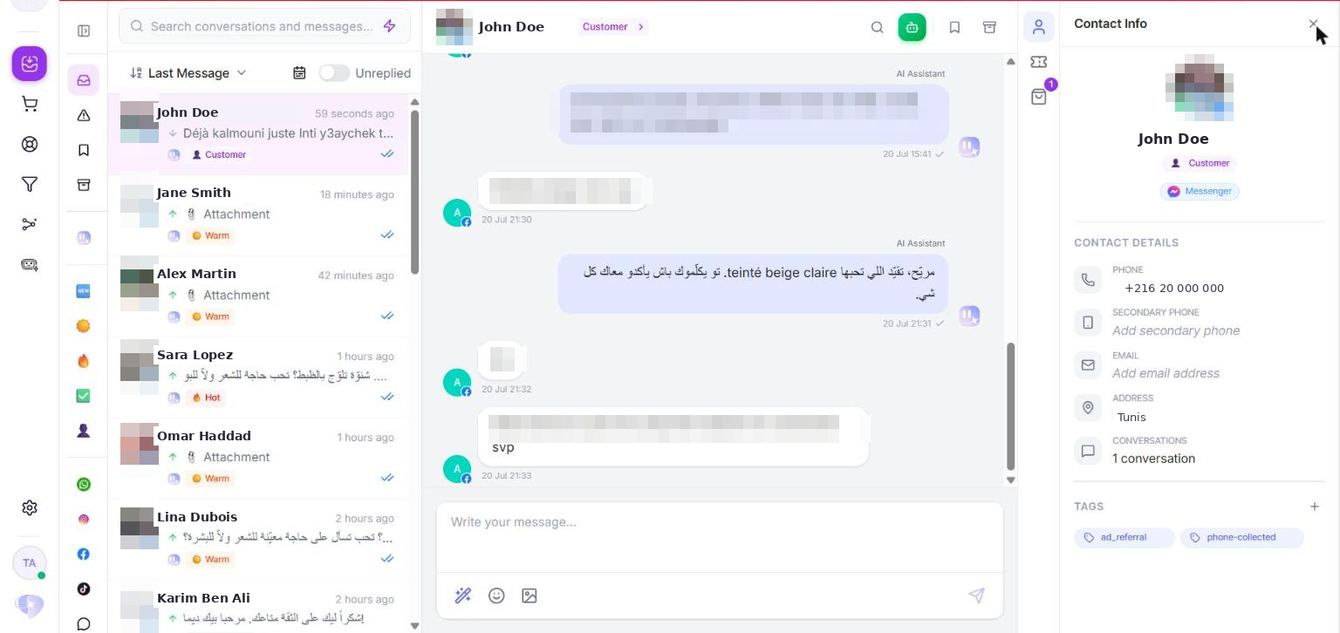
The layout is deliberately plain, as you can see below: conversation list on the left, the exchange in the middle, the contact profile on the right. The point is not the inbox. The point is that the agent has already replied in the customer’s language before anyone on your team reads the message, with the customer’s orders, tickets, tags and lead status sitting next to it.
You no longer need to staff five channels with people. Your main focus now is the ticket created and whatever the AI agent flagged, not the other three hundred conversations it already handled.
How it works
From five apps to one screen the agent already answers in
Allow pop-ups, then connect
Meta and TikTok connections open in a pop-up window. If pop-ups are blocked the page simply keeps loading with no error, so allow them for app.unifunl.io first. It is the single most common setup problem.
Connect your channels
In Settings → Channels. TikTok needs a verified TikTok Business account; Messenger needs a Page where you are an administrator; Instagram needs a professional account; the web widget needs the script pasted into your site.
Conversations arrive in one list
Recent conversations are imported automatically. Each avatar carries a badge showing its source, so you always know whether you are looking at WhatsApp, Instagram, Messenger, TikTok or the website, all from the same screen.
Invite your team and set roles
In Settings → Team settings. Owner has full control including billing, Admin covers configuration and operations without billing, Member handles conversations and tickets and is the default. Seats depend on your plan.
Turn the agent on
Test it privately in Live Test, then turn the Active switch on. From that point it replies on its own in every connected channel, escalating to your team only when a request exceeds it or a customer asks for a human.
Check the exceptions, not the apps
Filter by Unreplied to see only what the agent escalated or left open, sort by last message, and take over a single thread with AI Autopilot when you want to answer it yourself, without pausing the agent anywhere else.
Capabilities and impact
What a real unified inbox gives your team
01Five channels, one screen
WhatsApp, Instagram, Messenger, TikTok and the web widget all feed the same Inbox, with a channel badge on every avatar, so nobody switches apps to know where a message came from.
One place to look, and one honest count of who is actually waiting.
02An AI agent replying by default
AI Autopilot is on per conversation and the agent answers in the customer’s language across every connected channel, from the same catalog and configuration.
Most of the inbox is already handled before a person opens the tab.
03The Unreplied filter
Show only the conversations still waiting on a person, because the agent already answered everything it could, and sort by last message or the other available criteria.
The backlog is the short list of real exceptions, not five infinite scrolls.
04Contact profile beside the thread
Phone number, address, history, tags and lead status on the right, with shortcuts that open the contact, their tickets and their orders without leaving the conversation.
Nobody asks a returning customer for their address again.
05Lead status assigned automatically
Every contact moves from New to Warm to Hot to Converted on its own, based on what they say in the conversation.
You can see who is close to buying without reading the thread.
06AI Autopilot per conversation
The global Active switch controls the agent everywhere; AI Autopilot controls it in one thread. Turn it off to take a single customer yourself.
A human can step into one conversation without stopping automation across the rest.
07A writing assistant in your agent’s tone
When you reply yourself, it suggests and reformulates your response so a human message does not read differently from an agent one.
The brand voice survives the handover.
08Tickets created and categorised for you
Customer Request, Damaged Product, Complaint, Negative Sentiment and AI Limitation, with Negative Sentiment often detected before the customer says anything explicit.
Problems become tracked work instead of a message someone remembers.
09Flag a bad reply in one click
Hover an agent message, click the flag. Nothing is deleted and nothing is sent to the customer, your team is simply alerted.
Correcting the agent becomes part of glancing at the inbox, not a separate project.
10Tags your campaigns can use
Add vip, wholesaler or loyal customer from the contact profile, then target those same tags when you build a WhatsApp broadcast audience.
What the agent, or your team, learns in a conversation becomes a segment you can sell to.
Before you switch
What teams ask before moving to one inbox
Do we lose our existing conversations?
No.
When you connect a channel, recent conversations are imported automatically, so the Inbox does not start empty.
Can two people work the same inbox?
Yes
Invite colleagues by email; they join as Members and can be promoted to Admin. The number of seats depends on your plan, and Send Invite is disabled once they are all in use.
Can I stop the agent in one conversation without stopping it everywhere?
Absolutely.
Active is the global switch; turning Autopilot off in a thread lets you take that customer over while the agent keeps replying in every other conversation.
Proof
Teams running every channel from one screen, with the agent doing the replying
These are Unifunl customers whose conversations arrive across WhatsApp, Instagram, Messenger and their website, and whose AI agent answers most of them without a person involved. Each story explains what changed operationally, not just the headline number.
70%
Fewer agents on the same volume
I’m no longer thinking about hiring new salespeople. We grew orders 30% and conversion is at 40%, with 70% less agents.
Brazilian Glow
Siwar, CS Director, Brazilian Glow
Read the story100%
Conversations automated
The AI talks to every customer like a real cosmetic expert on every channel, 24/7. It fully runs our front line, 100% automated.
Rio Caviar
Operations, Rio Caviar
Read the story<2 min
Reply time through DMs
We doubled our sales going from 0 to 100+ orders a day, just through DMs, with no new hire. The AI replies in under 2 minutes.
WeePops
Founder, WeePops
Read the storyWhy this and not a shared mailbox
Collecting messages in one place is the easy half
Plenty of tools will pull your channels into one window. What they hand you afterwards is still a list of text: a person still has to read every message, look up who this is, check what they ordered, and type a reply, for every single conversation.
A shared inbox tool gets you one screen. Messages pool there, a person still answers each one, in order, then goes looking for the order history in another tab. A complaint becomes a ticket only if someone remembers to make one.
Unifunl’s inbox starts from the answer already written: an AI agent replies first, in the customer’s language, with orders and history already attached. Your team sees what got escalated or what someone chose to take over, and if it’s a complaint, it’s already a categorised ticket by the time they open it.
Measurement
What the inbox is actually costing and returning
Support gives you response and resolution times per ticket, plus views for what is assigned, pending and resolved, so the workload is a number rather than a feeling.
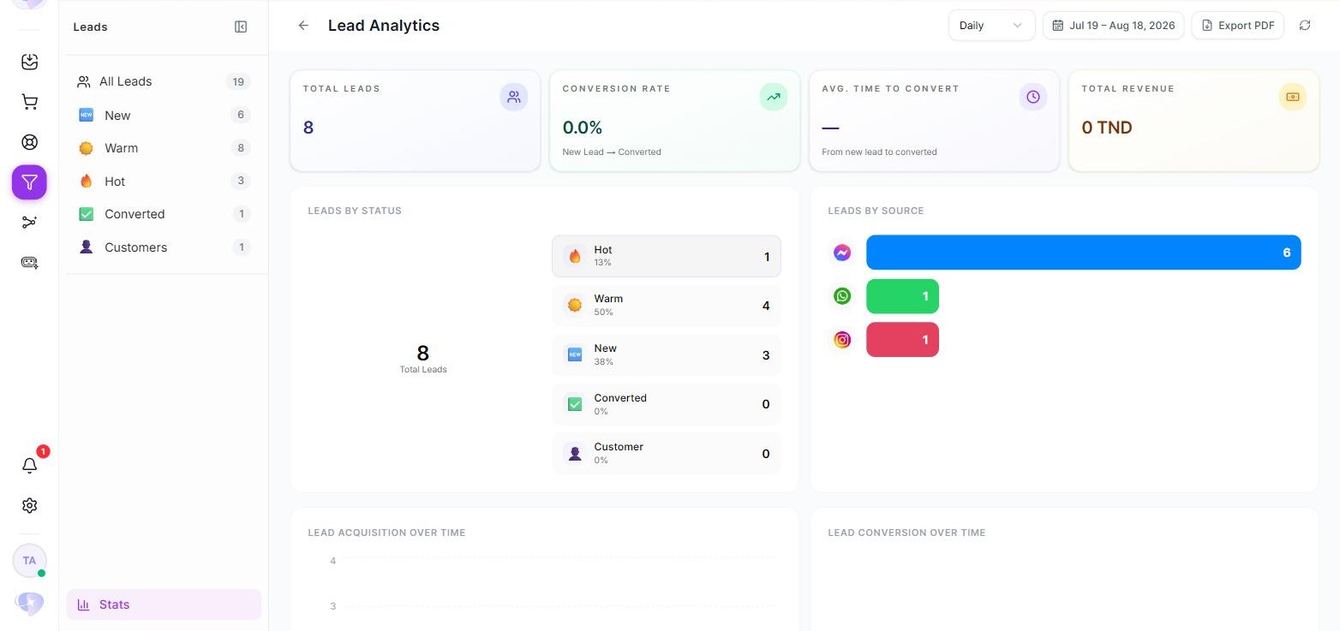
Lead analytics reports total leads, conversion rate, average time to convert, revenue, and the breakdown by status and by source, exportable as a PDF. That last breakdown is what tells you which channel is carrying the business.
Usage closes the loop: conversations in the period, generated orders, average credits per conversation and average credits per order. Set that against your plan’s credit price and you have the real cost of a sale the agent handled, versus one your team had to take over.
The outcome
What the working day looks like afterwards
Before
- Five apps, two phones, and no shared idea of who replied
- A person reads and answers every single message, on every channel
- Customer history looked up in another system, or not at all
- Complaints remembered rather than tracked
- No reliable count of who is still waiting
After
- One screen across WhatsApp, Instagram, Messenger, TikTok and web
- An AI agent answers most conversations before your team sees them
- Orders, tickets, tags and lead status beside the threads that are left
- Tickets created and categorised automatically, with response times
- The Unreplied filter as a short, honest list of real exceptions